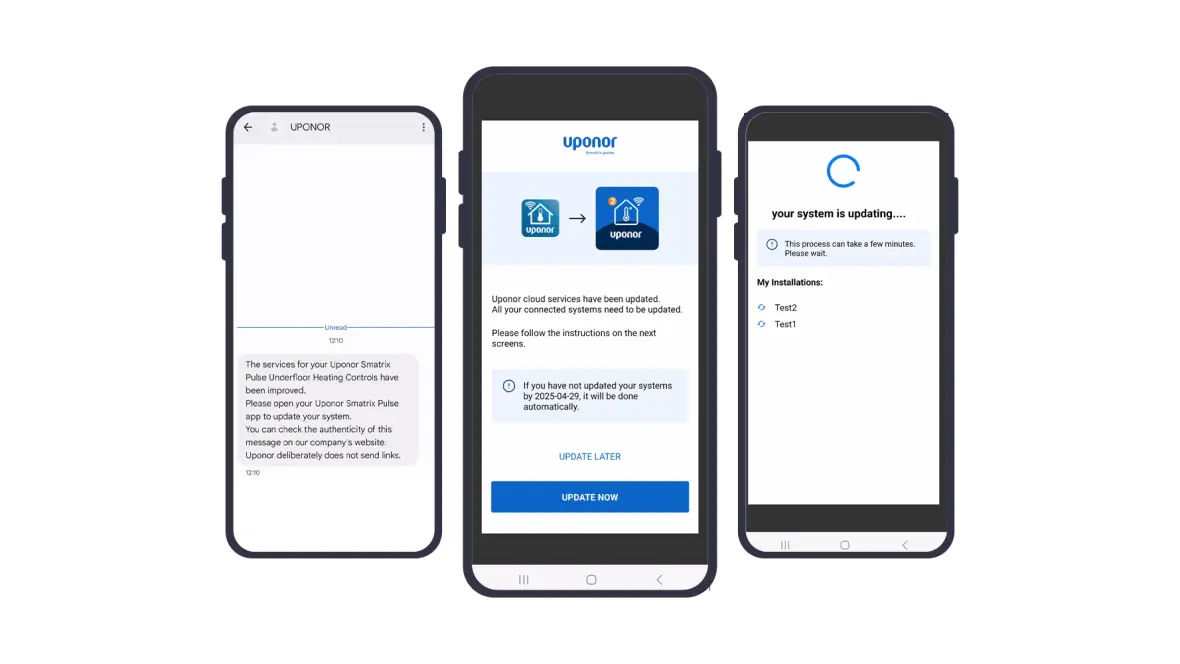
We’ve made it simple to transition to the new and improved Uponor Smatrix Pulse 2 experience. Follow these steps to ensure your system is updated and ready to go:
- Look Out for an SMS from Uponor: You should have received a message from us on the phone number registered with your Uponor Smatrix Pulse system. This SMS serves as a reminder of the changes and guides you to this webpage for more information.
- Open the Uponor Smatrix Pulse App: When you open the Uponor Smatrix Pulse App, you’ll see a message informing you about the update and what’s new.
- Click on “Update Now”: To kick off the process tap the “Update Now” button, and the App will guide you through the process.
IMPORTANT: After updating the new service, Google/Alexa integrations will need to be re-synchronized. To re-integrate easily, open the Google Home App, unlink the device, and then link it again.